| 8.5. Import Test Results | ||
|---|---|---|

|
Chapter 8. Execute |  |
| 8.5. Import Test Results | ||
|---|---|---|
|
|
Chapter 8. Execute | |
In Klaros-Testmanagement test results from various test frameworks can be imported (see Section 8.5.1, “Supported Frameworks”) for a complete list of supported formats). If the associated test cases or test suites are not already defined in Klaros-Testmanagement, they can be created automatically during the import.
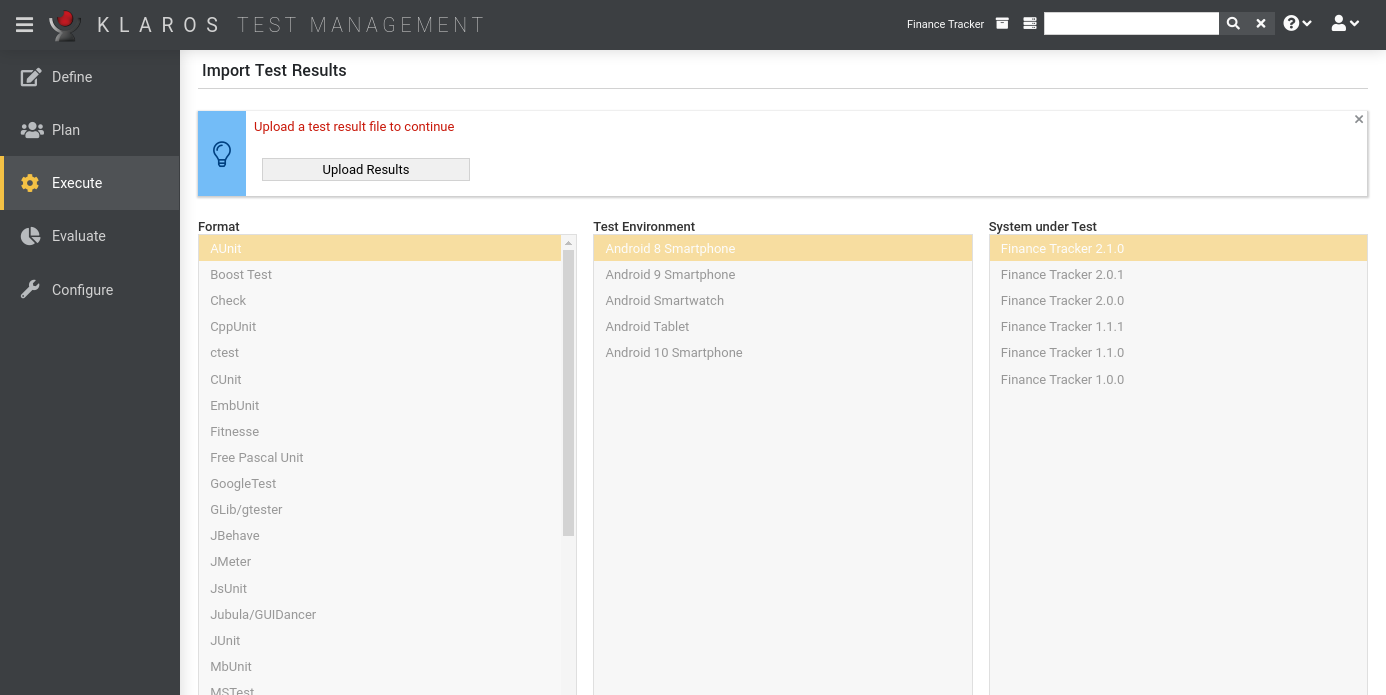
To start the import, an XML file with results from a supported test framework must be uploaded. When the file upload is completed it is mandatory to select the system under test and the test environment these results should be assigned to. The format of the result file is typically detected automatically.
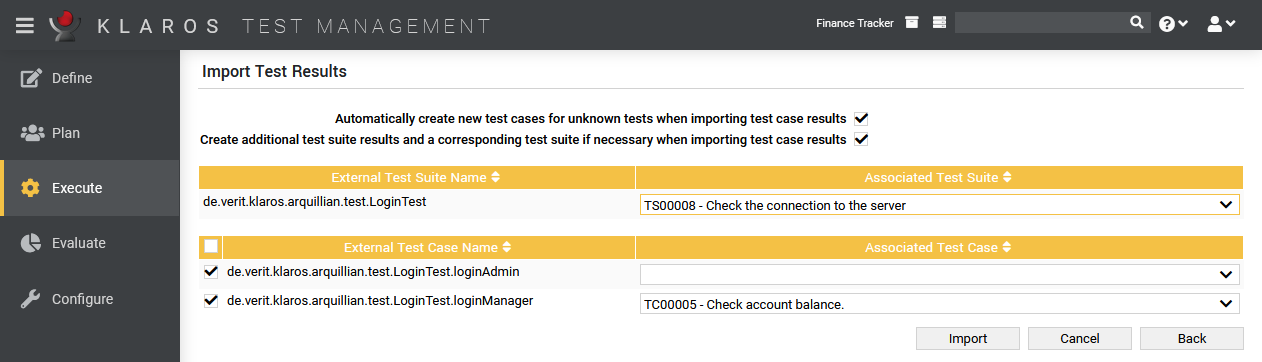
Clicking the button opens the Assign Test Results page. The test case of each test result can be selected here using the corresponding drop-down box. Each result must be assigned to a different test case. In addition, the test suite can be assigned as well.
Initial test suite / test case name matching is determined by the internal name of the test case or test suite in Klaros-Testmanagement vs. the external name of the test case or test suite in the result file. This heuristic can be overridden here. Once associated, the matching of a test case or test suite to an external name is automatically applied for further imports until defined otherwise. This also applies to result imports via REST API or other external sources like the Jenkins plugin.
You may decide to skip the import of individual results by deselecting the entry for this result using the checkbox on the left-hand side. If the import process is triggered by a test execution job, the initial selection is matched against the test cases or test suites contained in the job. Otherwise, all results are initially selected for import automatically.
If the option Automatically create new test cases for unknown tests when importing test case results is selected, a new test case is automatically created upon import when it is not already present.
When the option Create additional test suite results and a corresponding test suite if necessary when importing test case results is selected, test suite results are automatically created for the corresponding test suite information contained in the result file. This information may vary with the import format. Additionally, a corresponding test suite is created for the test suite result if it did not yet exist.
Pressing the button will import all results into Klaros-Testmanagement.
The following frameworks are supported:
| AUnit is an adaptation of the Java JUnit and C++ CppUnit unit test frameworks for Ada code. | |
| The Boost Testlibrary provides a matched set of components for writing test programs, organizing tests into simple test cases and test suites, and controlling their runtime execution. | |
| Check is a unit testing framework for C. | |
| CppTest is a portable and powerful, yet simple, unit testing framework for handling automated tests in C++. The focus lies on usability and extendability. | |
| CppUnit is a C++ unit testing framework. | |
| ctest is the testing driver provided by CMake. | |
| CUnit is a lightweight system for writing, administering, and running unit tests in C. | |
| Embedded Unit is unit testing framework for Embedded C Systems. | |
| Fitnesse is a tool for specifying and verifying application acceptance criteria (requirements). | |
| Free Pascal Unit is a port to Free Pascal of the JUnit core framework. | |
| GLib provides the core application building blocks for libraries and applications written in C. It provides the core object system used in GNOME, the main loop implementation, and a large set of utility functions for strings and common data structures. gtester is a utility to run unit tests that have been written using the GLib test framework. | |
| Gauge is a light-weight cross-platform test automation tool with the ability to author test cases in a business language. | |
| GoogleTest is a unit testing library for the C++ programming language created by Google. | |
| JBehave is a framework for Behaviour-Driven Development (BDD). BDD is an evolution of test-driven development (TDD) and acceptance-test driven design, and is intended to make these practices more accessible and intuitive to newcomers and experts alike. It shifts the vocabulary from being test-based to behaviour-based, and positions itself as a design philosophy. | |
| JMeter is a 100% pure Java application designed to load test functional behavior and measure performance. It was originally designed for testing Web Applications but has since expanded to other test functions. | |
| JsUnit is a Unit Testing framework for client-side (in-browser) JavaScript. It is essentially a port of JUnit to JavaScript. Also included is a platform for automating the execution of tests on multiple browsers and multiple machines running different OSs. | |
| Jubula provides automated functional GUI testing for various types of applications. | |
| JUnit is a simple framework to write repeatable tests. It is an instance of the xUnit architecture for unit testing frameworks. | |
| MbUnit is an extensible unit testing framework for the .NET Framework that takes in and goes beyond xUnit pattern testing. MbUnit is part of the Gallio bundle. | |
| MSTest is the command-line command that is used to run tests. This command has several options you can use to customize your test run. | |
| NUnit is a unit-testing framework for all .Net languages.It is written entirely in C# and has been completely redesigned to take advantage of many .NET language features, for example custom attributes and other reflection related capabilities. | |
| PHPUnit is a programmer-oriented testing framework for PHP. It is an instance of the xUnit architecture for unit testing frameworks. | |
| QF-Test is a professional tool for automated testing of Java and Web applications with a graphical user interface. | |
| The QTestLib framework is a tool for unit testing Qt based applications and libraries. | |
| Ranorex is a GUI test automation framework for testing of desktop, web-based and mobile applications. | |
| Selenium is a web browser automation tool primarily used for automated testing of web apps. Selenium is able to produce JUnit-compatible test results, which can be imported into Klaros-Testmanagement. | |
| Squish is a GUI Test Automation Tool for all kinds of cross-platform desktop, mobile, embedded and web applications. Squish is able to produce JUnit-compatible test results, which can be imported into Klaros-Testmanagement. | |
| TestComplete is a cross-platform automated GUI testing tool from SmartBear Software. | |
| TESSY is a software tool to automate module-unit testing of embedded software written in various embedded dialects of the programming languages C and C++. | |
| TestNG is a testing framework inspired from JUnit and NUnit but introducing some new functionalities that make it more powerful and easier to use. TestNG is able to produce JUnit-compatible test results, which can be imported into Klaros-Testmanagement. | |
| TUSAR stands for Thales Unified Software Analysis Report. It is a generic metric format composed of 4 categories: Coverage, Measure, Test and Violations. | |
|
Unified Functional Testing (UFT) / QuickTest Professional (QTP) |
Unified Functional Testing is a functional automated testing software by Micro Focus formerly known as QuickTest Professional (QTP) by HPE Software. |
| UnitTest++ is a lightweight unit testing framework for C++. It was for test-driven development on a wide variety of platforms. Simplicity, portability, speed, and a small footprint are all very important aspects. | |
| Valgrind is an instrumentation framework for building dynamic analysis tools. | |
| xUnit.net is a free, open source, community-focused unit testing tool for the .NET Framework. xUnit.net works with ReSharper, CodeRush, TestDriven.NET and Xamarin. |
![[Note]](images/note.png) |
Support for Frameworks not Listed Here |
|---|---|
|
Even if you did not find your favorite testing framework here this does not mean that it is not already supported. Many tools offer to export their result files in the JUnit XML format (e.g. Selenium, Robot and others) which is a supported format. |
|
|
 |
|
| 8.4. Continue Test Run |  |
Chapter 9. Evaluate |